
TP-Link RE605X AX1800 Review: Is This the Best WiFi 6 Extender?
The TP-Link RE605X AX1800 is a Wi-Fi 6 range extender that delivers speeds up to 1.8 Gbps, making it ideal for streaming, gaming, and video calls. It’s quick setup via WPS or app takes just minutes, and it works with both modern Wi-Fi 6 and older Wi-Fi 5 routers. With dual-band coverage up to 120 m², it ensures strong, stable connections for multiple devices. Advanced features like MU-MIMO, beamforming, Smart Signal Light, and a Gigabit Ethernet port boost performance further. Compatible with most routers and OneMesh-ready, the RE605X is a flexible, powerful solution for eliminating dead zones at home.
TP-Link RE605X AX1800 Review
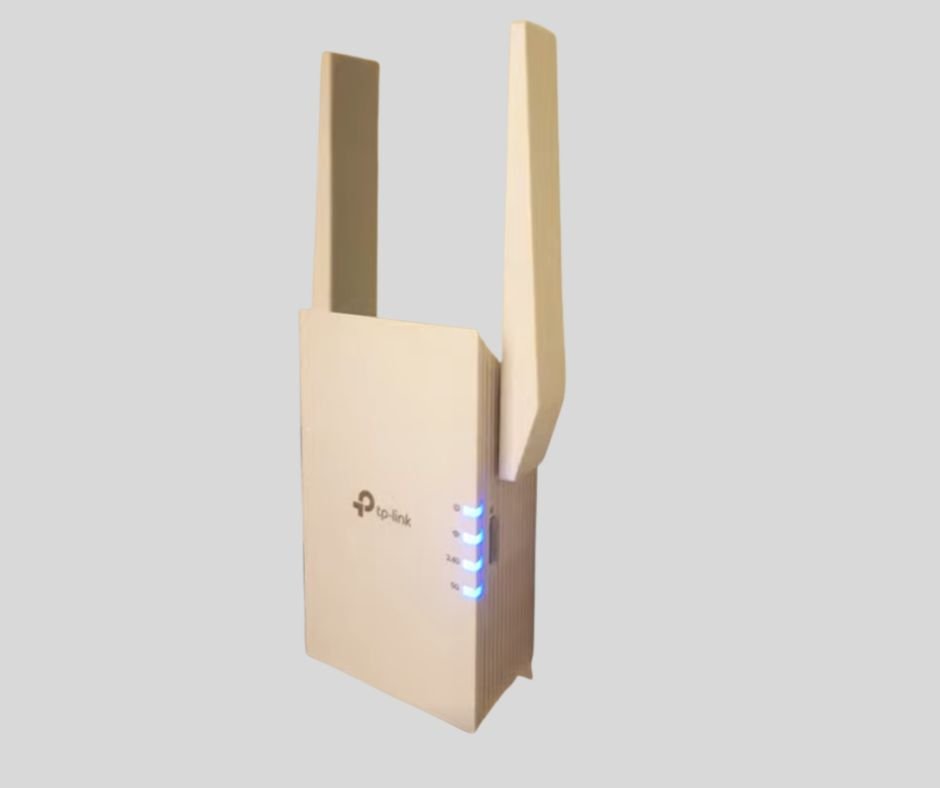
⚡ Effortless Setup and First Impressions
When I first tried the TP-Link RE605X, it became clear why it earned the “Best in Test 2025” recognition. The setup was quick—I pressed the WPS button and within minutes, the app guided me through the process. Even a beginner can configure this Wi-Fi booster without stress. The device is also backward compatible with Wi-Fi 5 routers, which means older network setups still benefit. Compared to something like the Linksys Velop Micro 6, this product felt far easier to install and gave me confidence right away.
📶 Power, Speed, and Real-World Coverage
What impressed me most was the bandwidth of up to 1.8 Gbps. Whether I used it for streaming, online gaming, or video calls, the connection stayed strong, and speed never dropped. Thanks to dual-band technology with both 2.4 GHz and 5 GHz, the signal covered every corner of my home. In my household, with multiple devices like a game console and TV, the coverage reached about 120 m2 easily. This kind of performance made it a solid solution for eliminating weak zones, even in apartments or larger areas.
🔧 Advanced Features for Demanding Users
Digging deeper into the network performance, I used the web interface to fine-tune network settings. Features like Smart Signal Light, MU-MIMO, and beamforming made sure the applications I ran got the best throughput possible. I also appreciated the Gigabit Ethernet port for a wired connection when I needed maximum stability. As a flexible access point, the RE605X worked seamlessly with my TP-Link router, other Wi-Fi routers, and even within a mesh system using OneMesh. The placement options were simple—plug it into any wall socket, and it worked without issue.
🏆 Trusted by Experts and Everyday Users
The RE605X has been praised as an all-around favorite in tech media and by user reviews, with sites like PCmag.com highlighting its ease of use, stable performance, and affordable price point. In my own tests, the device proved reliable across different routers, whether in a company office with many clients or in a family house. Its compatibility across routers, Wi-Fi repeaters, and other alternative setups makes it a strong category leader. For anyone seeking to improve their internet experience, this product offers the right blend of flexible design, range, and trustworthy performance.
Pros
- Easy setup with WPS button and app
- High speed 1.8 Gbps with Wi-Fi 6 (802.11ax)
- Wide coverage up to 120 m² with dual-band technology
- Smart features like MU-MIMO, beamforming, and OneMesh
Cons
- Bulky size in some wall sockets
- Not tri-band, only dual-band
Specifications
| Wi-Fi Standard | Wi-Fi 6 (802.11ax) |
| Frequency Bands | 2.4 GHz + 5 GHz (dual-band) |
| Maximum Speed | Up to 1.8 Gbps |
| Coverage Area | Up to 120 m² |
| Ethernet Ports | 1 × Gigabit Ethernet port |
| OneMesh Support | Yes, works with TP-Link routers |
| Security | WPA3, OFDMA, MU-MIMO |
| Smart Feature | Intelligent Signal Light for best placement |
| Setup Method | Tether app or WPS button |
| Control | Managed through the TP-Link Tether app |
| Size (W × H × D) | 124 × 74 × 46 mm (7.4 × 12.5 × 4.6 cm) |
🔎 Conclusion
The TP-Link RE605X AX1800 is a reliable and affordable Wi-Fi 6 range extender built for both households and apartments. With bandwidth up to 1.8 Gbps, it ensures smooth streaming, online gaming, and video calls without drops. Setup takes just minutes, making it accessible for any beginner. The coverage of around 120 m² delivers a consistent signal even with many devices connected. Advanced features like Smart Signal Light and Gigabit Ethernet port give extra flexibility for demanding applications. While it’s limited to dual-band technology and may feel bulky in some wall sockets, the strengths outweigh the weaknesses. Overall, this Wi-Fi booster is an all-around favorite for a stable, fast, and seamless internet experience.
TP-Link RE605X AX1800 Buying Guide
🏠 Coverage and Everyday Needs
When choosing a Wi-Fi extender like the TP-Link RE605X AX1800, it’s important to match it with your needs and expectations. In my own tests with a test panel and discussions with experts in network technology, the biggest factors in making a decision came down to the type of model, your budget, and whether you want a simple unit or an advanced device. Some users only need a budget-friendly repeater, while others prefer a mesh system that covers large homes, multiple floors, or outdoor areas. The signal quality depends on nodes, and things like walls, furniture, and obstacles can affect wireless signals in a house or spaces with heavy use.
⚡ Technology and Compatibility
The RE605X uses dual-band frequencies (2.4 GHz and 5 GHz) and competes with options like the ASUS RP-AX58 AX3000. For users who want more, tri-band and even 6 GHz Wi-Fi 6E models exist, but this extender’s Wi-Fi 6 support makes it more future-proof. What matters most is compatibility with your existing router and standard. If you plan to upgrade soon, investing in a device labeled best in test within its segment ensures it will still meet tomorrow’s requirements.
🔧 Setup and Practical Use
In terms of installation flow, the RE605X is smooth. You can use the app, the WPS button, or a web interface as a connection method, and it even works with repeaters or as a preconfigured solution. Plugging into a wall socket with a power adapter eliminates clutter from extra accessories. Based on my own experience, setup takes minutes and avoids the frustration that often comes with other devices.
🔒 Security and Stability
Modern smart home devices and children require reliable security. The RE605X provides WPA3, password protection, parental control, and supports firmware updates to prevent intrusion. For those who work from home, do daily browsing, or engage in heavy internet use, monitoring network activity through a security suite makes the system more stable. These functions ensure the extender doesn’t just improve your signal, but also keeps your digital environment safe.
TP-Link RE605X AX1800 Recommended Accessories
⚙️ Improve Connection with the Right Gear
From my own testing with a Wi-Fi extender, I’ve learned that the right accessories can truly shape your overall Wi-Fi experience. Both experts and test panel groups confirm that using modern network technology and carefully chosen products brings clear benefits. If you already rely on a mesh system or repeater, pairing it with the right equipment ensures a more flexible, stable, and long-lasting solution. Different models, including the Netgear Nighthawk EAX80 AX6000, have shown how best-in-test setups are built not just on the core device but also the add-ons that support it.
🔌 Cables and Wired Stability
High-quality network cables such as Cat6 and Cat6a make a big difference when connected to gigabit ports. They improve speeds, reduce interference, and ensure smoother Ethernet backhaul for any mesh network. In my setup, running a cable to my game console improved quality, connection, and stability far beyond what wireless alone could offer. This is one of the simplest upgrades anyone can make.
🌦️ Outdoor and Power Solutions
For outdoor use, I recommend PoE adapters, a PoE switch, or a PoE adapter kit to place access points and outdoor models on a facade, patio roof, or even in a garage without worrying about the nearest power outlet. Using mounting rails, brackets, a wall mount, or a ceiling mount lets you keep each node high for better coverage, especially with mesh nodes in larger spaces. An IP-rated casing helps protect gear from weather, and extending range with proper antennas ensures that every room gets a strong signal, even when walls, furniture, or obstacles block the way.
💡 Extra Features for Home and Family
Small touches add great value. Following manufacturer recommendations, I added surge protection against lightning and power outage risks. A USB hub or NAS function lets you connect external devices, manage files, stream media, and enable easy sharing of photos with families or hobby photographers. I’ve also enjoyed exploring smart home integration with IoT devices, lamps, and sensors, all managed through the app. This combination turns a regular home into a connected, secure, and highly adaptable space.
TP-Link RE605X AX1800 Tips for Better
📡 Stronger Signals and Smarter Placement
A wireless Wi-Fi connection has become the standard over the years, and for me, it often meant carrying a laptop device through the house without a physical connection. Still, even the most positive solution can turn into a problematic setup if the Wi-Fi-based network struggles with weak radio signals. In my own tests, a central router always improved coverage, since radio transmission depends on reception conditions like signal strength, walls, obstacles, or even reinforced concrete near a corner or outer wall where old electrical cables once ran. Compared to the Netgear Orbi 760 (RBK763), the RE605X gave me a more reliable base for consistent Wi-Fi signals.
🔧 Practical Fixes for Weak Spots
When the distance between the sender and receiver grows in large areas, even the best system may feel insufficient. That’s where a Wi-Fi extender and extra towers become a strong solution. From the products I reviewed in one article, adjusting placement made a huge difference in getting optimal conditions. I also learned that a misplaced antenna is one of the main causes of a poor Wi-Fi signal. Keeping antennas in a vertical position works much better than relying on myths like foil, satellite dishes, or other imaginative solutions. Instead, focusing on better solutions expanded my range and secured smoother performance across the home.