
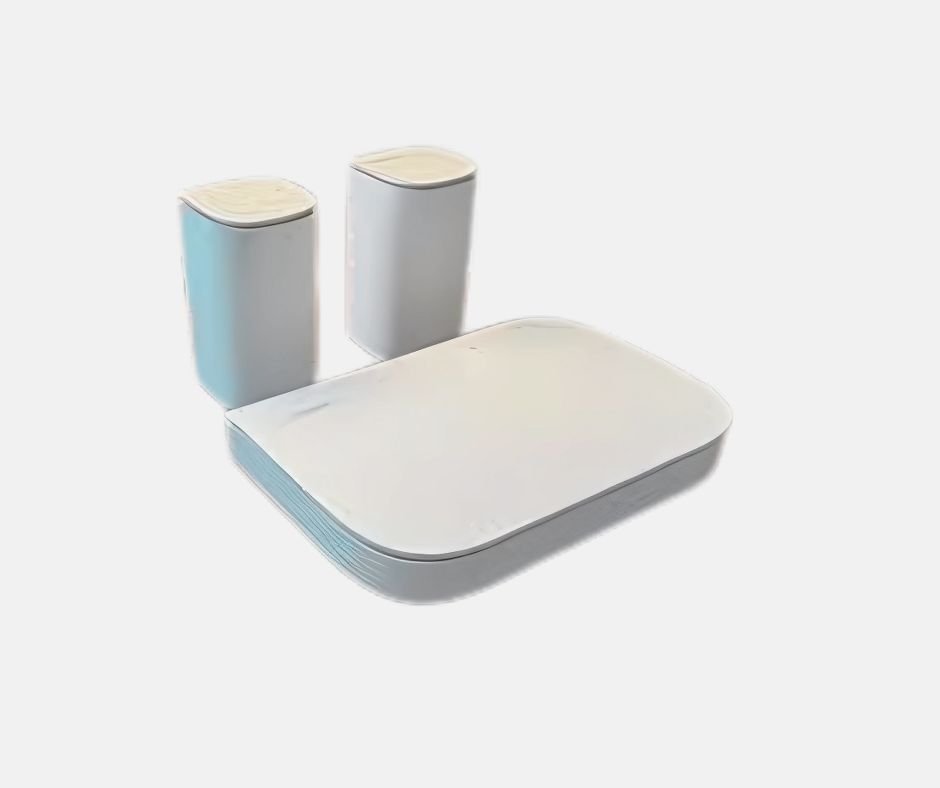
Linksys Velop Micro 6 Review: Compact WiFi 6 Power
The Linksys Velop Micro 6 is a compact Wi-Fi 6 mesh system designed for strong coverage and easy setup. It includes a main router and two nodes, delivering seamless dual-band performance across up to 2000 m². With speeds reaching over 1 Gbps, it supports streaming, gaming, and multiple devices simultaneously. The system automatically balances between 2.4 GHz and 5 GHz for stable connections. Features like WPA3 security, parental controls, and guest networks add reliability and safety. Future-ready with a 2.5 Gbps WAN port and expandable mesh, it’s a modern solution for home networks.
Linksys Velop Micro 6 Review
⚡ Compact Mesh Power for Everyday Homes
The Linksys Velop Micro 6 is built for the modern home, combining small satellites with a strong internet connection. This mesh system blends sleek design with the performance of a Wi-Fi booster network, making it an affordable and family-friendly option. With a main router, extra nodes, and a three-pack bundle, setup is simple. I had the installation running in a minute with a preconfigured password, and the app or Linksys app gave me full access to the advanced web interface and router settings.
🔧 Setup and Smart Features
Using the interface, I was able to create a guest network, add parental control, set browsing time, and block unwanted URLs. The performance of Wi-Fi 6, dual-band, and 802.11ax really stood out. Coverage extended up to 2000 square meters, close to what the TP-Link RE605X AX1800 offers. With bandwidth between 450 and 650 Mbps on satellites and over 1,131 Mbps on the router unit, the system easily handled streaming, gaming, and multiple devices at once.
📶 Stable Connections Across the Network
Thanks to SSID management, the 2.4 GHz and 5 GHz bands worked together as a unified network. The signal automatically balanced for stability, removing the stress of manual network setup. Still, there are limitations: it’s a dual-band system, not tri-band, and extra LAN ports are missing on satellites. For Wi-Fi-free devices, a cable connection is only possible in the room with the WAN port. Even though it supports 2.5 Gbps speeds, the inner system doesn’t always match it.
🔒 Security and Future-Proofing
On the safety side, security features like WPA3, secure access, and strong tracking controls give peace of mind. Advanced firewall settings, port forwarding, and traffic prioritization options ensure smoother performance for specific clients. Looking to the future, the extender feels future-proof, with internet capacity designed for multi-gigabit-level internet upgrades. As a mesh router system, it can expand with more mesh routers to meet growing needs. With mentions of Wi-Fi 7 and Wi-Fi 6e on the horizon, this remains an excellent alternative for reliable home use, backed by multi-gigabit potential, solid hardware, and user-friendly technology.
Pros
- Easy installation with preconfigured password
- Compact design blends into interior
- Strong coverage up to 2000 square meters
- Wi-Fi 6 performance supports streaming and gaming
- WPA3 security with parental control and guest network
Cons
- No LAN ports on satellites
- Dual-band only, not tri-band
Specifications
| Product type | Mesh system (3-pack) |
| Bands | Dual-band – 2.4 GHz + 5 GHz |
| Wi-Fi standard | Wi-Fi 6 (802.11ax) |
| Maximum speed | Up to ~3 Gbps |
| Coverage | Around 12 meters per node – suitable for an average apartment |
| Nodes | 1 main router, 2 satellites |
| Ethernet | 1× Gigabit per node, 2.5 Gbps WAN on the main unit |
| Security | WPA3, WPA2, WPS |
| Features | MU-MIMO, parental control, guest network, QoS |
| Management | App + web interface (iOS/Android) |
| Size | Main unit – 21.5 × 14.2 × 4.5 cm, Satellites – 5.8 × 5.8 × 11.8 cm |
| Users | Beginners & advanced – easy setup with manual control |
🔎 Conclusion
The Linksys Velop Micro 6 is a practical choice for everyday household needs. It combines sleek design with reliable Wi-Fi 6 performance. Coverage of up to 2000 square meters handles streaming, gaming, and multiple devices. The system is easy to install, making it friendly for beginners. Built-in security features, such as WPA3 and parental controls, add peace of mind. While limited by its dual-band capabilities and lack of LAN ports, it remains dependable. For users seeking an affordable, future-proof mesh system, it’s a smart option.
Linksys Velop Micro 6 Buying Guide
🏡 Choosing the Right Setup
When picking between a Wi-Fi extender, a repeater, or a full mesh system, it’s important to think about your needs and expectations. I’ve seen how a test panel and experts in network technology consider different factors before making a decision. The model you choose depends on whether you need an advanced device for a large house with several floors and outdoor areas, or just a simple unit for smaller spaces. With options ranging from budget to best in test, finding the right segment is about matching your area, connection, and type of homes.
⚡ Technology and Compatibility
Performance depends on the signal and how well it manages nodes, walls, furniture, and other obstacles that weaken wireless signals. Devices like the ASUS RP-AX58 AX3000 compete directly in this space, offering dual-band, tri-band, and even 6 GHz Wi-Fi 6E options. Still, the Linksys Velop Micro 6 stands strong with Wi-Fi 6, excellent compatibility, and easy pairing with any router that supports the right standard. If you plan to upgrade, choosing a future-proof system helps you stay ready for tomorrow’s demands.
🔧 Setup and Practical Use
I found the installation flow straightforward. A simple app, a quick tap on the WPS button, or using a connection method like the web interface makes things easy for both beginners and advanced users. Unlike some repeaters that require extra accessories like a power adapter or awkward wall socket placement, the system came preconfigured and ready to go. This avoided the frustration I’ve often felt with less polished solutions, making it a smoother experience overall.
🔒 Security and Daily Life
In a home full of smart home devices and children, I value strong security. Built-in features like WPA3, password protection, parental control, and regular firmware updates protect against intrusion. For anyone who works from home, does heavy browsing, or constantly internet, monitoring network activity through a security suite ensures a stable and safe connection. For me, this peace of mind was just as important as performance, making the solution practical in everyday life.
Linksys Velop Micro 6 Recommended Accessories
⚡ Boosting Wi-Fi with the Right Tools
Adding the right accessories to a Wi-Fi extender or mesh system can improve both the Wi-Fi experience and overall performance. I’ve seen how experts and a test panel often compare products like the TP-Link RE450 with the Linksys Velop Micro 6, focusing on benefits, reliability, and network technology. Extra equipment, such as repeaters or specific models, makes the system more flexible and stable, helping to build the best solution for a modern home.
🔌 Wired Accessories and Speed
Simple upgrades like network cables (Cat6 or Cat6a) and proper use of gigabit ports can increase speeds and reduce interference. For gamers, running Ethernet backhaul to a game console is a game-changer for quality, connection, and stability. Within a mesh network, even a single node benefits from careful placement, extending coverage and improving how mesh nodes communicate across rooms.
🌦️ Outdoor and Power Options
For outdoor use, I’ve relied on PoE adapters, a PoE switch, or a PoE adapter kit to connect access points and outdoor models on a facade, patio roof, or in the garage, all without worrying about the nearest power outlet. Using mounting rails, brackets, a wall mount, or a ceiling mount lets me position devices higher, boosting the signal across walls, furniture, and other obstacles. An IP-rated casing also protects against weather, helping maintain long-range and reliable service.
💡 Smart Add-ons for Daily Life
Following manufacturer recommendations, I added surge protection to guard against lightning and power outage risks. For media lovers, a USB hub or NAS function helps connect external devices, manage files, and share photos, media, and content with families or hobby photographers. I’ve also enjoyed using smart home integration features with IoT devices, lamps, and sensors, all controlled by the app. With these accessories, even the best in test models become more adaptable, ensuring every part of the home stays connected.
Linksys Velop Micro 6 Tips for Better Use
📡 Improve Signal Placement
A wireless Wi-Fi connection is now the standard, but after years of using different setups with my laptop device at home, I’ve learned that even a strong Wi-Fi-based network can become problematic. Weak radio signals from a central router can reduce coverage, especially if radio transmission is blocked by poor reception conditions, thick walls, or reinforced concrete near a corner or outer wall with old electrical cables. Unlike the Netgear Orbi 760 (RBK763), the Linksys Velop Micro 6 handles Wi-Fi signals better when placed more centrally, ensuring signal strength is stable across different areas.
🔧 Practical Fixes for Weak Spots
If the distance between the sender and receiver is too large, even good systems can feel insufficient. In such cases, adding a Wi-Fi extender or extra towers becomes the right solution. I tested different products for an article and found that adjusting placement created more optimal conditions. A simple antenna adjustment fixes many causes of a weak Wi-Fi signal—keeping antennas in a vertical position is far more effective than trusting myths like foil, satellite dishes, or other imaginative solutions. Instead, focusing on better solutions expanded the range of my network and made everyday use much smoother.